From first draft to signed Table 1 — one record, one place
TableOne Flow holds your Table 1 from first draft through CP sign-off, with the evidence pinned to the criterion it justifies and every change recorded against the person who made it.
Section 1 · Criterion 11
Sample security
All drill core and RC chip samples were sealed in poly bags at the collar on recovery and transported directly to the contracted laboratory in Kalgoorlie by company vehicle. Chain of custody documentation was completed for every batch. No samples were stored on site overnight. Laboratory receipt confirmation was matched against the field dispatch list for each batch; discrepancies were investigated before assay submission was authorised.
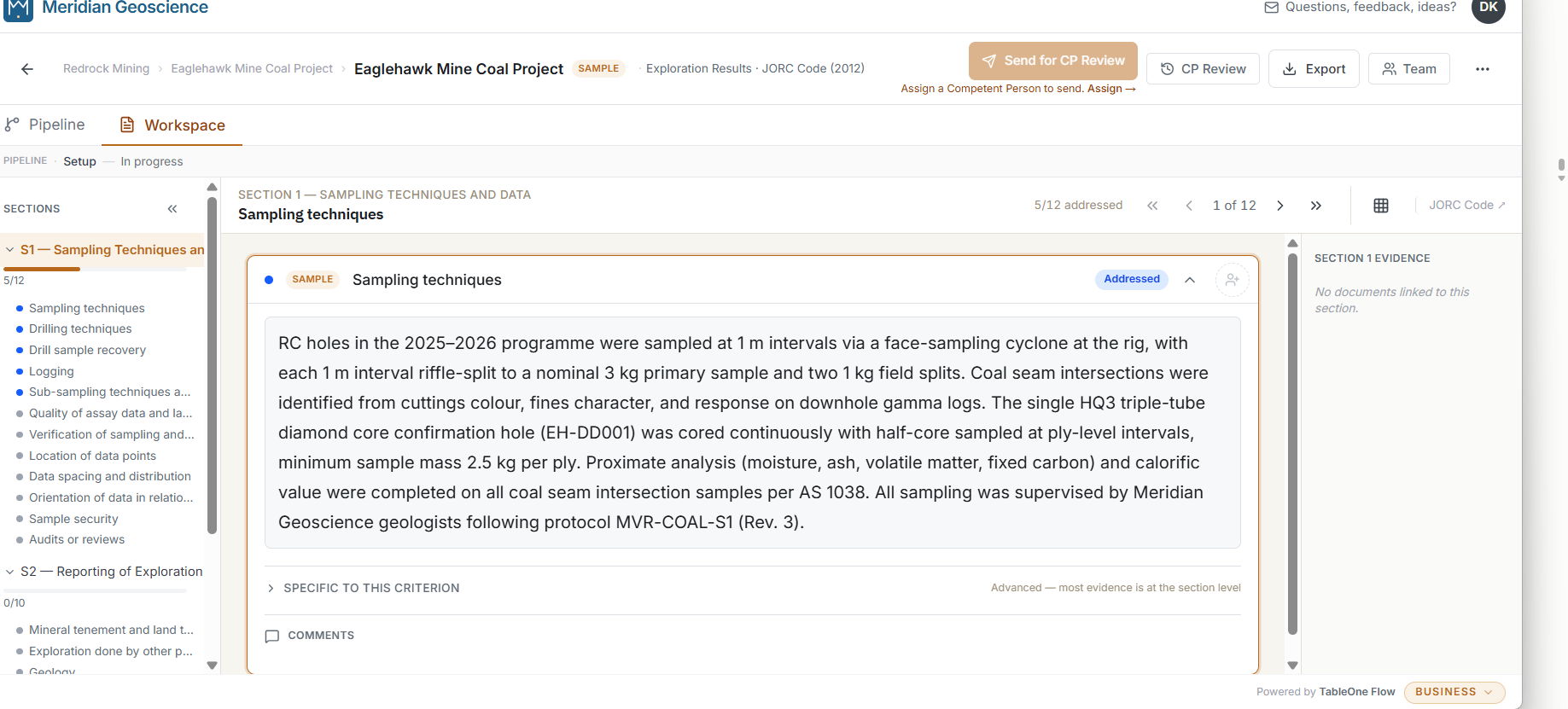
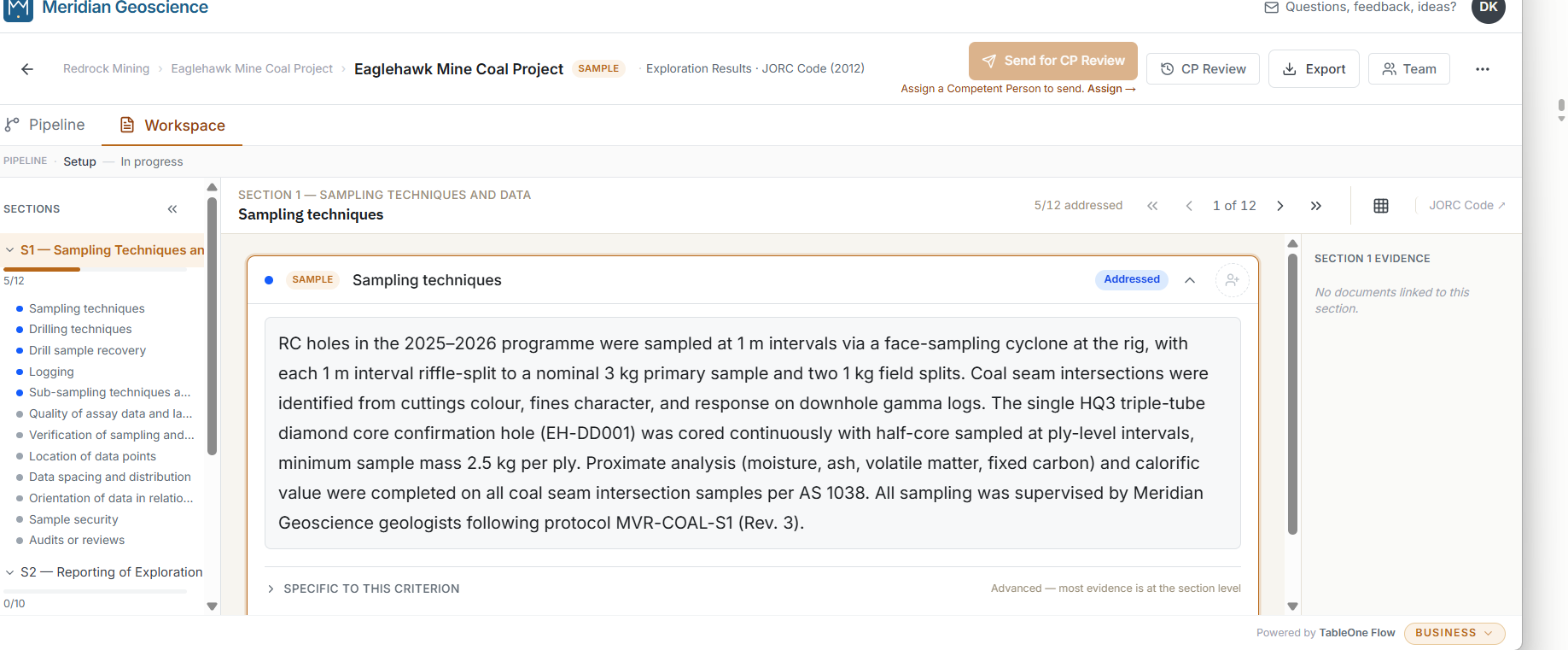
The drafting workspace — criterion editing pane with evidence rail and CP-accepted status badge.
Your words, structured and signed
No one starts from a blank page. Every criterion opens with a structured prompt built from the JORC 2012 Code, the “if not, why not” requirement enforced by the schema, and right-panel guidance authored for that criterion. Quality signals flag incomplete responses and criteria with no attached evidence file before the criterion reaches the CP — not during the review.
You draft every criterion response. The Competent Person signs what the Competent Person wrote. The product does not put AI between you and the words a CP signs. The right-panel guidance for each criterion is authored against the JORC 2012 Code text and Commentary — not generated.
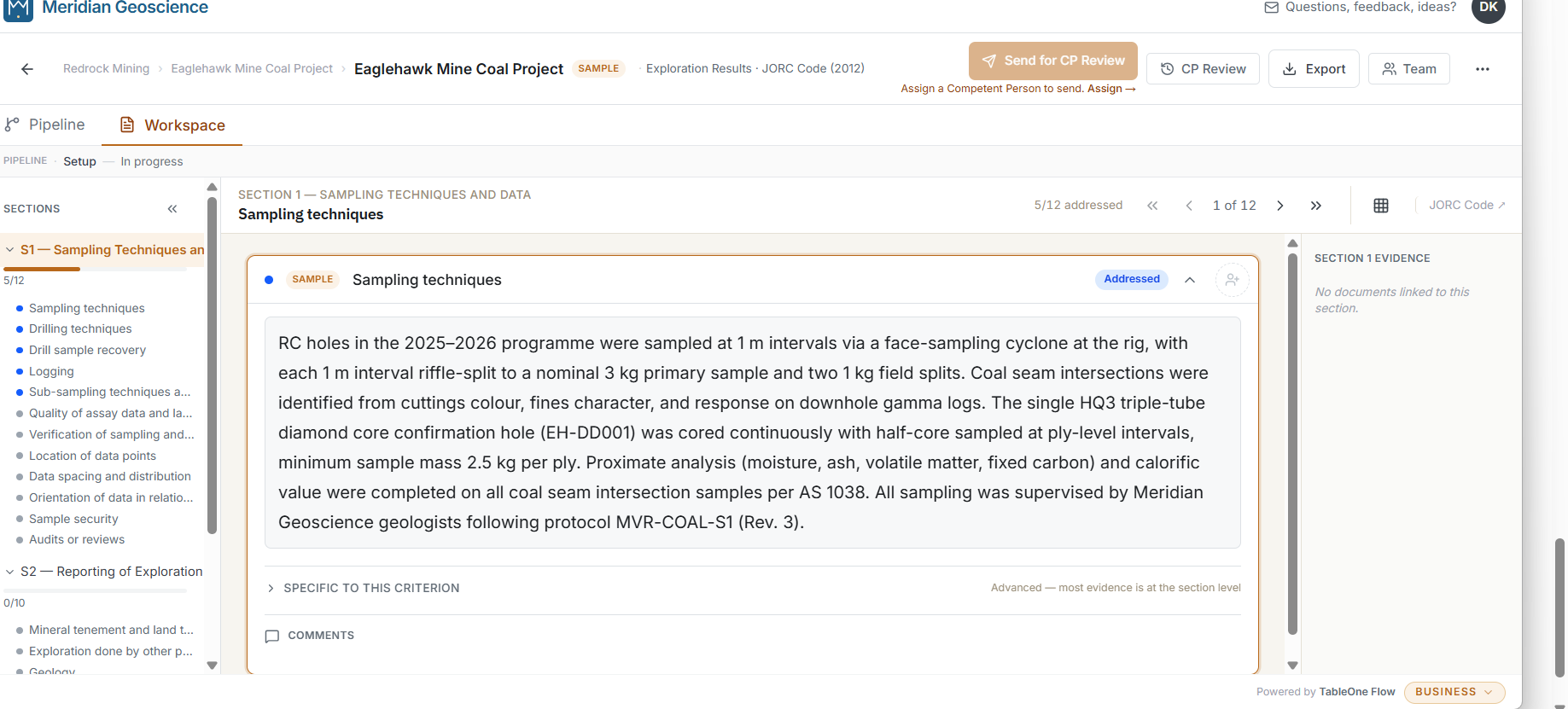
Drafting workspace — Eaglehawk Mine Coal Project, Sampling techniques criterion. The right panel shows JORC-authored criterion guidance; the status badge tracks completeness across the section. · Tap to enlarge.
Competent Person review — in the app, on the record
The CP sees a complete document, not a first draft. By the time the Table 1 reaches CP review, quality signals have already flagged incomplete criteria and criteria with no attached evidence file. The CP reviews each criterion against its response, marks it Accepted or Needs revision, and the comment thread is anchored to the criterion — not to a paragraph in a Word document that has moved by the next round.
Per-criterion review status and a criterion-level diff between drafts are part of the export. When a regulator asks how the Table 1 was drafted, the record is in the app — not in an email thread.
Pipeline view — Copperhead Ridge Gold Project. The Internal Review stage is blocked; the report cannot advance to CP assignment until the reviewer clears it. Each stage gate is explicit, not implied. · Tap to enlarge.
Evidence pinned to the criterion it justifies
Source documents, spreadsheets, drilling logs, QAQC files, sign-off PDFs — each piece of evidence is attached to the Table 1 criterion it supports. All tiers support attaching evidence files locally. Pro adds fingerprinting at submission, cloud-synced storage, and an identity-anchored submission record. Direct Excel cell and range linking is on the Pro roadmap.
Estimation stays in your existing tools — Excel, Vulcan, Surpac, Minescape. TableOne Flow holds the criterion structure and the evidence pinned to it; estimation tools stay where they are.
Structured export
The Table 1 exports to Word and Excel with your organisation's branding. Criterion order, section boundaries, and “if not, why not” attribution are preserved exactly. TableOne Flow holds the record; your firm assembles and publishes the report.
The record you produce when you sign it
Your name is on the report for the life of the Public Report, which may outlast the company that published it. Every change is logged against a named identity with a timestamp. Evidence is pinned to the criterion it justifies. When the report is published, you export the Table 1 and the evidence as a structured record independent of the tool that produced it.
Published report — Quinn Downs Silver Prospect. Pipeline complete. Observer view: the CP’s credentials and review record are visible after publication. · Tap to enlarge.
Multi-CP coordination — Business tier
For consulting practices and in-house teams with several CPs across several projects: assign CPs by Table 1 section, run review rounds, merge comments criterion by criterion, and track a portfolio of reports across stages. An internal reviewer role provides a QA gate before the CP send. See Business tier for full detail.
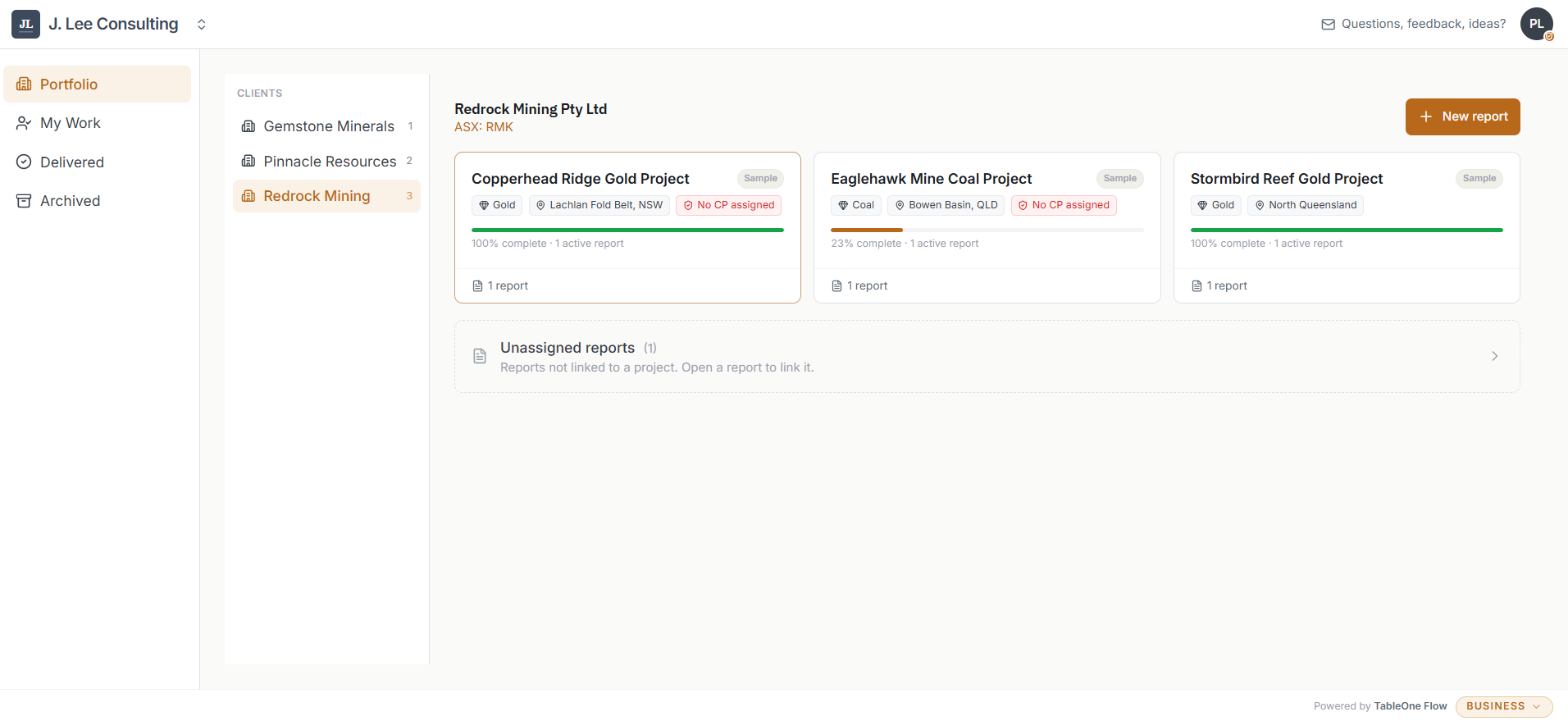
Business tier portfolio — Redrock Mining. Three projects in view: Copperhead Ridge (100% complete, no CP assigned), Eaglehawk Mine (23% complete), and Stormbird Reef (100% complete). Commodity, jurisdiction, CP assignment status, and active report count at a glance. · Tap to enlarge.
Questions
Does TableOne Flow claim JORC compliance?
No. The JORC Code itself is a Code for Public Reporting, not a Code that regulates the manner in which a Competent Person estimates Mineral Resources or Ore Reserves. We describe TableOne Flow's output as structured to JORC 2012 Table 1 criteria; adequacy of any specific response stays with the Competent Person. See our positions for the Code's own guideline.
Does TableOne Flow generate criterion content with AI?
No. You draft every criterion response. The product does not put AI between you and the words a Competent Person signs. The right-panel guidance in the product is authored content, not AI.
Is my Table 1 content used for AI training?
No. Your Table 1 content is not used for model training, evaluation, or any AI-adjacent work. Not for internal QA. Not for tuning the product against your data. Your content stays with you. This is a design constraint in the product, not a policy paragraph.
How does TableOne Flow handle the relationship with Excel and other estimation tools?
Estimation stays in the tools you already use — Excel, Vulcan, Surpac, Minescape. TableOne Flow is the drafting layer above them. Evidence files from those tools attach to the criterion they justify. Direct Excel cell and range linking is on the Pro roadmap.
What happens at JORC 2026?
The JORC 2026 Code is in development. TableOne Flow's product architecture handles versioned Code references — every criterion is anchored to a specific Code version. We intend to support JORC 2026 from day one of the transition period; we label that as a roadmap intention, not as present alignment with a draft Code.
Where is my Table 1 content stored?
Your Table 1 content and audit-trail records are stored in Australia. Free is a Windows desktop application — all project data stays on your device, no cloud sync. Pro and above sync encrypted to cloud infrastructure currently in the Australian region. See the privacy policy for the full processor stack.
Tiers
- Free
- Windows desktop application. JORC 2012 Table 1 structure; your data stays on your device. No subscription.
- Pro
- One CP licence, CP-centric. Cloud sync with offline mode. Configured supporting roles (drafters, observers). Full CP review workflow; identity-anchored audit trail; Excel cell linking planned.
- Business
- Multi-CP consultancies and in-house teams running multiple projects. External users (contract authors and clients). Portfolio view; internal-reviewer role. Offline editing included.
- Enterprise
- Self-hosted on your own infrastructure. Scoped deployment and onboarding, bespoke SLA and procurement terms. All Business features.
TableOne Flow is free to start. Pricing for Pro, Business, and Enterprise is coming soon. Pricing →
Early access
You’re on the list. We’ll write with early access timing when the product is ready.